
Manage thousands of photos
in minutes, not hours
Photo Mechanic™ alternative for Mac. Built by a photographer who knows what culling software is missing. And did we mention, it's cheaper?
- Client galleries with watermarks, face filtering, and selection
- Quick Zoom, navigation, filters, Face Browse, Showcase, Capture One export
- Face search — find every photo of a specific person. Closed-eye filter
- Visual similarity search based on a selected photo
macOS 14 Sonoma or later · Apple Silicon · 30-day trial
Features
Everything you need for photo culling
From AI face recognition to client galleries — one tool instead of ten.
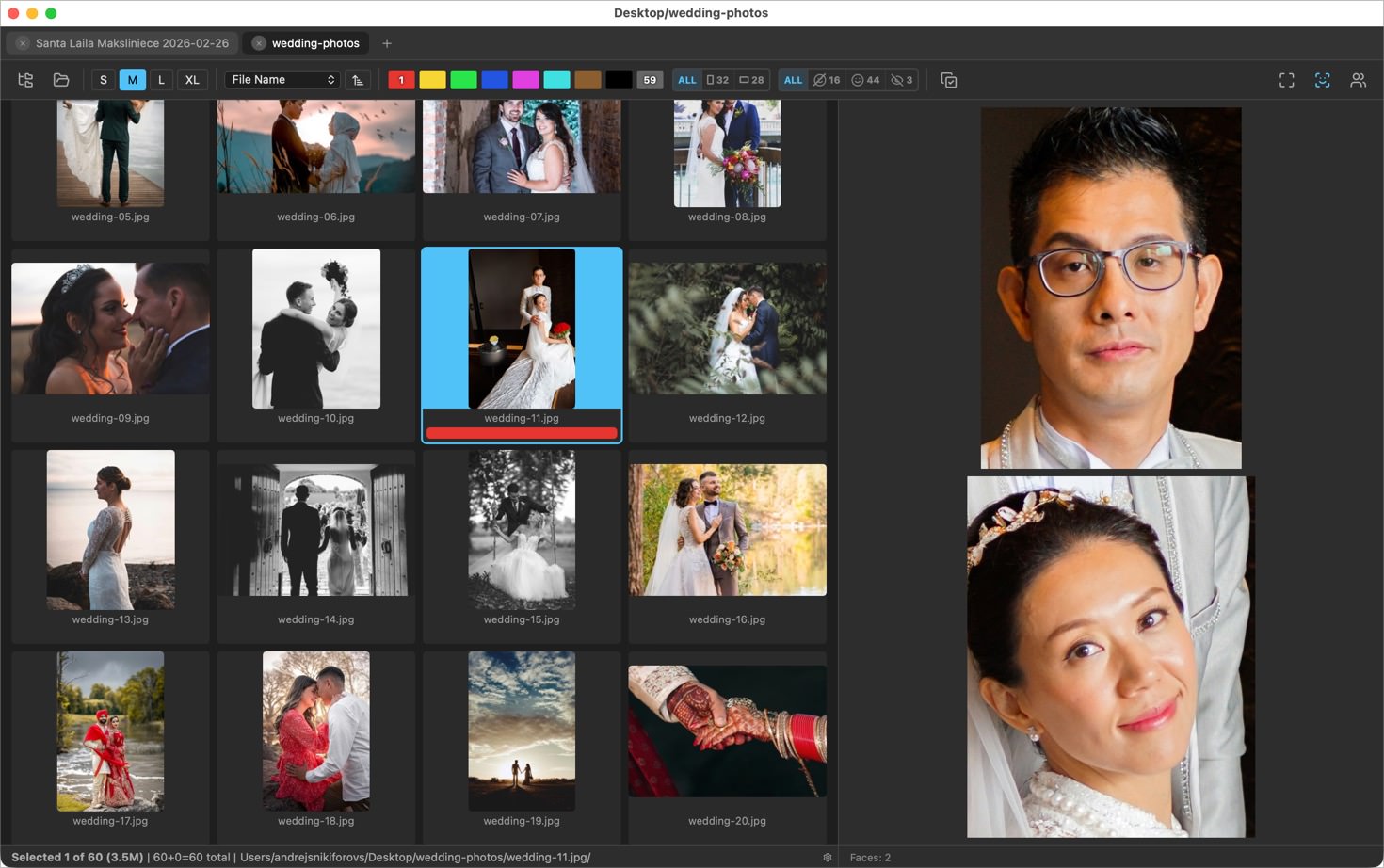
Face recognition
PhotoWorker automatically detects faces and groups photos by person. Filter out closed eyes with one click — no more manual sorting through hundreds of shots.
Lightning-fast gallery
Tens of thousands of photos scroll smoothly with zero lag. Open a folder from an entire wedding or festival — everything loads instantly.
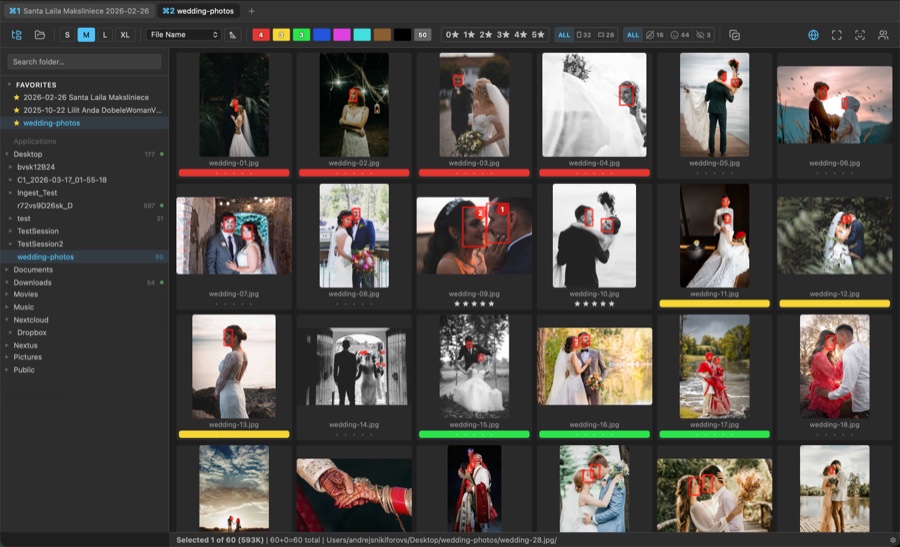
Ratings & color labels
Star ratings 0–5 and color labels compatible with Photo Mechanic. Keyboard shortcuts for instant culling.
Showcase presentations
Present photos to your client in full screen. Beautiful layout, click-to-zoom, and arrow key navigation — like a professional presentation.
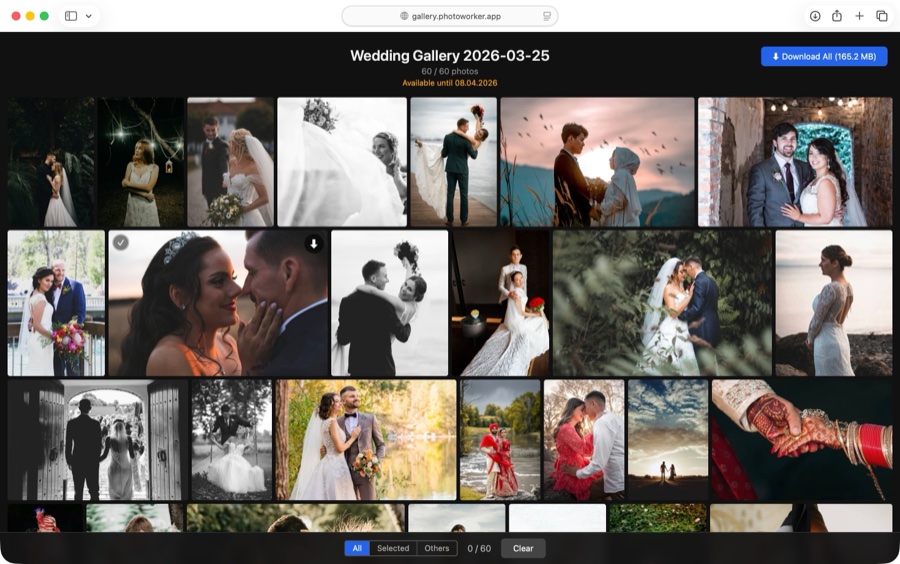
Client galleries
Send your selects to a client as an online gallery with a shareable link. Add watermarks and enable client selection — they pick their favorites right in the browser.
Capture One export
Finished culling? One click sends your selects to Capture One as a ready-made session. Ratings and labels carry over, RAW files are matched automatically.
Side-by-side comparison
Open shots side by side — zoom right where your cursor is, or let smart zoom find faces and show them close up. Choose between duplicates in seconds.
FaceBrowse
Select a photo and instantly see every face on it, cropped large in the side panel. Spot closed eyes, turned heads, and the best expressions at a glance.
Workflow
One session. Three steps.
PhotoWorker is built around one goal: get from a full memory card to a finished result fast, without switching between apps.
Open
Drag a folder into the window or open it from the menu. PhotoWorker instantly shows previews and starts indexing faces in the background. You can work with the gallery right away — no need to wait for indexing to finish.

Cull
The gallery is built for speed. Use keyboard shortcuts for ratings and color labels, smart similarity sorting, and AI-powered closed-eye filters. The face panel helps you focus on specific people. Process hundreds of photos in minutes.
Deliver
Create an online gallery with one click and send the link to your client. They open it in any browser, browse, and download all photos with a single button. Or enable selection mode — the client picks their favorites and you get their choices back in PhotoWorker. Optionally add watermarks or face filtering.
Only in PhotoWorker
What other culling tools don't have
Face search across your entire shoot, client galleries, and visual similarity — built in, not bolted on.
Face search across the shoot
Not just detection on one photo. PhotoWorker clusters faces and finds every shot of any person across thousands of frames.
Client galleries included
Deliver finals in a beautifully designed gallery or let clients select photos for editing. Shareable link, watermarks, no separate service.
Visual similarity search
Select a photo and instantly find every similar frame. Narrow down bursts, compare angles, find the best shot.
Supported formats
FAQ
Frequently asked questions
How is PhotoWorker different from Lightroom?
PhotoWorker doesn't replace Lightroom — it complements it. PhotoWorker specializes in fast culling: face recognition, smart sorting, instant ratings. Once your selects are ready, open the finals in Lightroom or any other editor.
Which RAW formats are supported?
CR2, CR3 (Canon), NEF (Nikon), ARW (Sony), DNG, RAF (Fujifilm), RW2 (Panasonic), ORF (Olympus), PEF (Pentax), SRW (Samsung), 3FR, FFF (Hasselblad). Previews are extracted from the embedded JPEG inside the RAW file for maximum speed.
Does it require an internet connection?
No. All AI models and processing run locally on your Mac. Internet is only needed for license activation and uploading client galleries.
Is PhotoWorker compatible with Photo Mechanic?
Yes. Ratings and color labels are stored in XMP sidecars and fully compatible with Photo Mechanic and other XMP-aware applications.
Which Macs are supported?
PhotoWorker requires macOS 14 (Sonoma) or later and an Apple Silicon processor (M1 or newer). Intel Macs are not supported.
Where are client galleries hosted?
Galleries are hosted on Cloudflare R2 — fast and reliable storage. Photos are uploaded with watermarks and automatically deleted after 14 days.
Is there a free trial?
Yes — 30 days of full access to every feature. No account or credit card. Enter your email, download, and try it on a real shoot. After the trial, it's €34 for the app.
Try it on a real shoot
30-day trial. No account. No credit card.
macOS 14 Sonoma or later · Apple Silicon
See pricing